Border

IntegralUI TreeView for .NET WinForms

Rich hierarchical data presentation

IntegralUI TreeView logoIntegralUI TreeView gives you the next step in creating professional and modern user interface. With it you can customize the hierarchical presentation of data like never before. Images, text and custom controls can be included in every node, and it gives you more flexibility in creation of custom user interface.

Includes fast list creation, XML encoding of node text, rich styling features, customizable appearance and theme support.

Download
IntegralUI TreeView

* Roll-over the hyperlinks to see examples

  • WYSIWYG designer
  • Highly customizable appearance
    • General color styles for checkboxes, scrollbars and control background
    • Different color styles for every state of nodes and subnodes
    • Styles can be inherited from the parent control
    • Appearance of the nodes and subnodes  can be set by custom images or color schemes
    • Nodes can have space between them
    • Partial or Full Transparency
    • Customizable border with three shapes and control over visibility of each border side
    • Office 2007 fading effect with five speed levels
    • Watermarks
    • Theme support
    • Visual Styles
      • Vista
      • XP
      • Classic
  • Nodes
    • Separate color style for each state of the node (Normal, Disabled, Hovered, Selected and Focused)
    • Each node can contain text, image, checkbox, flag and custom controls
    • Text of the item and subnodes can be formatted by using special XML tags
    • Control over node border shapes and visibility
    • Node can be visible or hidden
    • Context Menus
    • Node text is editable
  • Behavior
    • Ability to present custom animation along with process progress during execution of any operation
    • Built-in keyword search
    • Built-in Sort and ability to add custom sort operations
    • Customizable ToolTips
    • Multiple node selection
    • Permissions over nodes reordering, Drag&Drop operations, selection check, hover selection, label edit
    • Advanced Drag&Drop operations
      • Predefined – nodes can be reordered showing the reorder position mark
      • Custom – create your own Drag&Drop operation
    • XML encoding
      • Advanced formatting options by use of XML tags
      • A table based formatting of the item content, with which a complex data can be presented in a single node
      • Every content element can have their own color and format styles
      • Multiple images at different places in the single content
      • Multiple custom controls at different places in the single content
      • Content alignment for every element
      • Place various elements in paragraphs and tables
      • Content can be shown in multiple lines or paragraphs
    • XML serialization
      • Support for serialization in files
      • Support for serialization in streams

* Roll-over the hyperlinks to see each screenshot

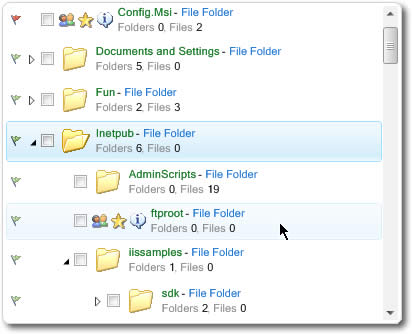
Nodes with Custom Controls

To demonstrate the possibilites and features implemented in LidorSystems components, you can download and test the following sample applications. Each sample is provided as a stand alone executable so it can be easily downloaded and tested. All samples are included with our products and are provided with complete source code.

Sample applications Size
IntegralUI ListView Explorer
Explorer
Demonstrates how IntegralUI TreeView control can be used to create a Windows Explorer-like application. It includes various appearances, three visual styles (Classic, XP, Vista), Advanced Drag&Drop operations and Multiple selections. Among the advanced features is the XML encoding of nodes with which you can add hyperlinks, text in multiple paragraphs with different colors and fonts. Also it present the Office 2007 fading effect in 5 speed levels.
231 KB
 
IntegralUI TreeView Custom Controls
Custom Controls
Demonstrates how custom controls can be included in IntegralUI TreeView.
214 KB

Built Using

  • Visual C# .NET 2005
  • Visual C# .NET 2003

Compatible Containers

  • Visual Studio 2008
  • Visual Studio 2005
  • Visual Studio .NET 2003
  • .NET Framework v3.5
  • .NET Framework v3.0
  • .NET Framework v2.0
  • .NET Framework V1.1

System Requirements

  • Disk Space: 9MB
  • Memory: 32MB
  • Software: .NET Framework 1.1 or higher
  • Operating System: Windows 2000 or higher

Can be deployed on

  • Windows 98
  • Windows 2000
  • Windows Server 2003
  • Windows ME
  • Windows XP
  • Windows Vista

Below is a complete history of this product releases.

Date Version   Description
October 15, 2008 V2.0   NEW: Improved creation of item's content with various objects: Text, Images, Hyperlinks, Custom Controls, CheckBoxes, Flags, etc.
NEW: Advanced formatting options by use of XML tags
NEW: A table based formatting of the item content, with which a complex data can be presented in a single item
NEW: Every content element can have their own color and format styles
NEW: Multiple images at different places in the single content
NEW: Multiple custom controls at different places in the single content
NEW: Content alignment for every element
NEW: Place various elements in paragraphs and tables
NEW: Ability to present custom animation along with process progress during execution of any operation
NEW: Built-in keyword search
NEW: Built-in sorting and option to add custom sort operations
NEW: Built-in check box scenario with three states
NEW: Built-in controls: CheckBox
NEW: Built-in drag&drop functionality for ListView groups
NEW: Customizable ToolTips
NEW: Option to change the roundness of control border corner
NEW: Improved performance during Expand/Collapse
NEW: TagString property for every list control
FIX: Image Editor cannot be used from control editor in VS 2005/2008
FIX: AfterSelect event is fired before firing the GotFocus event
FIX: MessageBox shown from XML Encoding needs to be removed
FIX: The MouseWheel event is not marked as handled
FIX: The BeforeLabelEdit event is fired before the text is changed
FIX: CursorConverter fires an error in VS 2005/2008
FIX: During editing of item label, the process cannot be canceled. Also, the BeforeLabelEdit and AfterLabelEdit events doesn't carry with them the original item text.
FIX: Custom Controls are not scrolled by clicking on the horizontal scrollbar arrows
March 20, 2008 V1.6   NEW: ItemDrag event, fired during start of a custom drag&drop operation
NEW: ItemMouseHover, fired when mouse cursor hovers for some time over node space
NEW: ScrollPosChanged, fired when there is a change in scrollbar value
NEW: ShowStateImages, property with which you can control the appearance of State Images
NEW: DropMarkerType, property with which you can change the appearance of drop marker during drag&drop operation
NEW: Two new sample projects demonstrating the use of custom controls and drag&drop operations

FIX: In LabelEdit mode, the node text editing control is shown whenever the mouse is clicked
FIX: The State Image is not shown every time
FIX: When the border corners are set all Squared programmatically, the border area remains unpainted
FIX: During Expand/Collapse of nodes, sometime nodes overlap other nodes
FIX: Other minor bug fixes
January 9, 2008 V1.5.367   NEW: Level property showing the depth of tree nodes
NEW: FlatNodes property giving a flat collection of tree nodes
NEW: ChangeCheckState method for changing the check state of nodes without firing BeforeCheck and AfterCheck events

FIX: ItemObjectClicking event which is fired before hyperlink is clicked
FIX: There is a delay when scrolling very large set of nodes
FIX: AfterLabelEdit event is fired during mouse up without active text editor
FIX: When the bold text in nodes or items is edited, the end word is hidden in text editor
FIX: Calling the Move method sets the SelectedNode property to null
FIX: The outer edge of the control does not paint under Windows Server 2003
Some other minor bug fixes
October 17, 2007 V1.5   NEW: The position of vertical scrollbar can be programmatically changed
NEW: Method for determining whether the item is present in the parent control display area
NEW: Control over visibility of reorder mark during drag&drop operation
NEW: Controls are supported under Windows Vista

FIX: An event is raised when user clicks a hyperlink in the item
FIX: The outer edge of the control does not paint under Vista
FIX: The TreeView constructor is somewhat slow when multiple tree views are present on the Form
FIX: While collapsing tree nodes, the scroll bar position changes
FIX: The FocusNodeChanged event will be thrown whenever there is a change in a focus node
Some other minor bug fixes
June 22, 2007 v1.4.271   NEW: Two new events: FocusedNodeChanging and FocusedNodeChanged, for better control over focus changes
NEW: FocusedNode can be set programmatically
NEW: Two new properties PreserveCheckState and PreserveSelection, gives you more control over checking and selection of nodes
NEW: The checking of nodes from selection of it is now controlled

FIX: When calling the Move method specifying the Up/Down direction for the node, an error occurs
FIX: When adding an array of child nodes with controls in them, to the TreeNode contstructor, the controls are not shown
June 1, 2007 v1.4   NEW: Office2007 fading effect
NEW: Every tree node can display more than one image
NEW: In predefined drag&drop, reorder mark appears showing where tree nodes can be placed
NEW: Focus style, used to show nodes when they are focused
NEW: Control over visibility of custom controls inside tree nodes
NEW: Separated over update of layout logic and painting
NEW: Each node can display state image

FIX: Registration window appears in design mode, after the evaluation period is expired
FIX: When adding new tree nodes, with vertical scrollbar moved down, the existing controls have wrong position
FIX: When expanding tree nodes and the horizontal scrollbar is moved to the right, the last character of the nodes doesn't show
FIX: When adding a new node for editing, the parent node text becomes hidden
FIX: The Tag property is not serialized. (The Tag property is serialized only when this object is string)
FIX: Calling the SelectedNodes.Clear method doesn't alter the Selected property of the nodes
February 13, 2007 v1.3   NEW: Every tree node can contain a reference to custom context menu
NEW: Ability to use predefined or create custom drag&drop operations
FIX: Improved selection of tree nodes
FIX: During drag&drop operation, you cannot drop a tree node to an empty tree view
December 21, 2006 V1.2.47   NEW: Support for custom made expand box and checkbox
FIX: The area for checking the tree node is too small
FIX: While moving the mouse-over the nodes, the hovered node is not properly displayed
December 06, 2006 V1.2   NEW: Scrolling and automated expanding of tree nodes during drag&drop operations
FIX: Scrolling of tree nodes is slower than usual
FIX: Sometimes the tree view control freeze, during drag&drop operations
FIX: When filling the Treeview with a small Dataset, the drawing of the control seems to pause and then it fills the tree
November 15, 2006 V1.1.237   FIX: Selecting and expanding of tree nodes is slower than usual
FIX: Contained controls in tree node appears after tree node is collapsed
FIX: When we use rich text formatting, the scroll bar doesn't show always how much space is needed to show the entire tree view
October 23, 2006 V1.1   NEW: XML serialization of tree view structure and overall appearance
July 06, 2006 V1.0.2   FIX: Node text cannot accept strings with less then 4 characters
June 27, 2006 V1.0.1   FIX: Control responds to the scrolling of the wheel even when there are no scrollbars visible
FIX: Drawing of the context menu creates a problem when the drawing rectangle has a zero height
FIX: The painting is slow when scroll
June 01, 2006 V1.0   First release
License Type 1 license 4 licenses 8 licenses 1 Site Wide 1 Enterprise
Developer License $159.00 $319.00 $639.00 $1,119.00 $2,799.00
Developer License with Annual Subscription $209.00 $419.00 $839.00 $1,469.00 $3,679.00
Annual Subscription Renewal $99.00 $199.00 $399.00 $699.00 $1,749.00
Developer License Upgrade to IntegralUI Lists [1] $209.00 $419.00 $839.00 $1,469.00 $3,679.00
Source Code Blueprint License [2] $129.00 $129.00 $129.00 $129.00 $129.00
Source Code Blueprint Renewal License [3] $99.00 $99.00 $99.00 $99.00 $99.00
[1] Only valid for customers with existing Developer License
[2] Current developer license required
[3] Current source code license and current developer license required

* Annual Subscription for the product allows free updates, upgrades, new components and priority support for one year.
NOTE: You must also buy developer licenses.

Crossgrade Licensing Options 1 -> 4 1 -> Site 4 -> Site
Developer Licenses $159.00 $959.00 $799.00
Developer Licenses with Annual Subscription $209.00 $1,259.00 $1,049.00
Read more about payment options and other licensing information Buy Now

The product is delivered electronically, by downloading the software from a server. You can make your own backup copy of the downloaded software, which we highly recommend. After purchasing you will receive an email with your serial numbers and registration information.

With each purchase you receive:

  • 30-day money back guarantee
  • Unlimited e-mail support
  • Discussion forum support
  • Free minor upgrades for a period of 90 days
  • Sample applications with source code
  • Run-time Royalty Free products
We offer Standard and Subscription Support. To see the differences between them, please check our Support Policy.

License Type

Developer License
Grants a developer the right to use the purchased product in production applications. Minor upgrades are free for a period of 90 days after purchase. Does not include Subscription support options.

Annual Subsription
Allow developers to receive free upgrades to the latest versions as they are released, as well as priority support for one year after purchase. It may be renewed annually.

Annual Subsription with
Source Code

Includes the Source Code and one year of free product upgrades and source updates for the product being purchased. Source Code is included by purchasing 4 Developer License and up with Annual Subscription plan.

IntegralUI TreeView

Newsletter

Subscribe to Lidor Systems' newsletter to get occasional news, tips, and offers.
Enter your e-mail address:
  

more...

Product Bundles

Individual Products

Contact Sales

Customer Service
(at ComponentSource)

US and Canada
Toll Free: 888 850 9911
M-F 9:00 - 18:00 (EST)

United Kingdom
Toll Free: 0800 581111
M-F 08:00 - 24:00

Direct Line
+389 (32) 634 944
M-F 08:00 - 18:00

E-mail
sales@lidorsystems.com

Border