Border

IntegralUI ListView for .NET WinForms

Rich data presentation in multiple views

IntegralUI ListView logoIntegralUI ListView is a .NET WinForms custom control, with plenty of options for display, selection and sorting of data and item collections. It has four different views to display items (Details, Large Icon, Small Icon and List) , built-in Live Editor and advanced Drag&Drop support, fast item list creation, XML encoding of Columns, Items and Subitems , rich styling features, highly customizable appearance and theme support (including Vista).

Download
IntegralUI ListView - Enhanced display, sorting and selection of item collections

* Roll-over the hyperlinks to see examples

  • WYSIWYG designer
  • Highly customizable appearance
    • General color styles for checkboxes, scrollbars and control background
    • Different color styles for every state of Columns, Groups and Items
    • Styles can be inherited from the parent control
    • Appearance of the Columns and Items can be set by custom images or color schemes
    • Columns can be drawn over items
    • Columns can have space between them
    • Items can have space between them
    • Partial or Full Transparency
    • Customizable border with three shapes and control over visibility of each border side
    • Office 2007 fading effect with five speed levels
    • Watermarks
    • Theme support
    • Visual Styles
      • Vista
      • XP
      • Classic
  • Columns
    • Every column can have header and footer
    • Header of column can contain text and image
    • Text of the column header and footer can be formatted by using special XML tags
    • Control over border shapes, corners and visibility for the column header, body and footer
    • Separate color style for each state of the column (Normal, Hovered and Selected state)
    • Each column can contain text and image
    • Fixing the columns to the left or right side of the control layout
    • The width of the column can be fixed
    • Permission over reordering the columns
    • Column can be visible or hidden
  • Groups
  • Items
    • Separate color style for each state of the item (Normal, Disabled, Hovered, Selected and Focused)
    • Each item can contain text, image, checkbox, flag and subitems
    • Text of the item and subitems can be formatted by using special XML tags
    • Control over item border shapes and visibility
    • Item can be visible or hidden
    • Every item can be grouped
    • Context Menus
    • Item text is editable
  • Behavior
    • Multiple item selection
    • Arrange items in four list view appearances
      • Details
      • List
      • LargeIcons
      • SmallIcons
    • Permissions over column reordering, Drag&Drop operations, selection check, hover selection, label edit
    • Advanced Drag&Drop operations
      • Predefined – items can be reordered showing the reorder position mark
      • Custom – create your own Drag&Drop operation
    • Advanced sort operations
      • Predefined – columns can be sorted by the content value: String, Integer and Double
      • Custom – create your own sort operation
    • XML encoding
      • The columns, groups and items text can contain hyperlinks, substrings with different colors and font
      • Text can be shown in multiple lines or paragraphs
    • XML serialization
      • Support for serialization in files
      • Support for serialization in streams

To demonstrate the possibilites and features implemented in LidorSystems components, you can download and test the following sample applications. Each sample is provided as a stand alone executable so it can be easily downloaded and tested. All samples are included with our products and are provided with complete source code.

Sample applications Size
IntegralUI ListView Custom Controls
Custom Controls
Demostrates how custom controls can be included in IntegralUI ListView. Data is presented in advanced detail view with fixed columns to the left or right side, four custom controls are included (DateTime Picker, CheckBox, ComboBox and TextBox), column visibility, items shown in groups. Various appearances of groups, expanding and collapsing of groups.
281 KB
 
IntegralUI ListView Explorer
Explorer
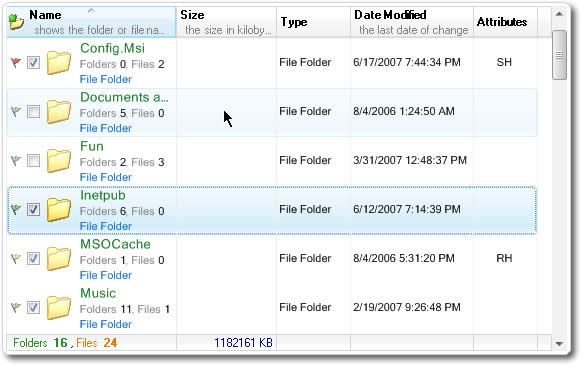
Demonstrates how IntegralUI ListView control can be used to create a Windows Explorer-like application. It includes various appearances, three visual styles (Classic, XP, Vista), Advanced Drag&Drop operations, Column reordering, Sorting and Multiple selections. Among the advanced features is the XML encoding of column and item text.
281 KB
 
IntegralUI ListView Image Scaling
Image Scaling
See how images or icons of your files displayed with IntegralUI ListView can be rezised just by moving the size control slider. Displaying checkboxes and flags, as well as Office 2007 fading effect is also available for demonstration.
1.2 MB

Built Using

  • Visual C# .NET 2005
  • Visual C# .NET 2003

Compatible Containers

  • Visual Studio 2008
  • Visual Studio 2005
  • Visual Studio .NET 2003
  • .NET Framework v3.5
  • .NET Framework v3.0
  • .NET Framework v2.0
  • .NET Framework V1.1

System Requirements

  • Disk Space: 9MB
  • Memory: 32MB
  • Software: .NET Framework 1.1 or higher
  • Operating System: Windows 2000 or higher

Can be deployed on

  • Windows 98
  • Windows 2000
  • Windows Server 2003
  • Windows ME
  • Windows XP
  • Windows Vista

Below is a complete history of this product releases.

Date Version   Description
March 20, 2008 V1.2   NEW: ItemDrag event, fired during start of a custom drag&drop operation
NEW: ItemMouseHover, fired when mouse cursor hovers for some time over node space
NEW: ScrollPosChanged, fired when there is a change in scrollbar value
NEW: ShowStateImages, property with which you can control the appearance of State Images
NEW: FindItem, method for searching an item with matching text
NEW: GetSubItem, method retrieves a reference to a subitem on which mouse cursor hovers
NEW: Two new sample projects demonstrating the use of custom controls and drag&drop operations

FIX: In LabelEdit mode, the node text editing control is shown whenever the mouse is clicked
FIX: The State Image is not shown every time
FIX: When the border corners are set all Squared programmatically, the border area remains unpainted
FIX: The item images still occupies memory, even when they are replaced with new images
FIX: Other minor bug fixes
January 9, 2008 V1.1.367   NEW: Columns in ListView and TreeListView can be autosized

FIX: ItemObjectClicking event which is fired before hyperlink is clicked
FIX: AfterLabelEdit event is fired during mouse up without active text editor
FIX: When the bold text in nodes or items is edited, the end word is hidden in text editor
FIX: The outer edge of the control does not paint under Windows Server 2003
Some other minor bug fixes
October 17, 2007 V1.1   NEW: Can contain custom controls in every subitem
NEW: 4 ways to control the visibility of contained custom controls
NEW: The position of vertical scrollbar can be programmatically changed
NEW: Method for determining whether the item is present in the parent control display area
NEW: Control over visibility of reorder mark during drag&drop operation
NEW: Controls are supported under Windows Vista

FIX: An event is raised when user clicks a hyperlink in the item
FIX: The outer edge of the control does not paint under Vista
FIX: The FocusItemChanged event will be thrown whenever there is a change in a focus node
Some other minor bug fixes
June 22, 2007 V1.0   First release
License Type 1 license 4 licenses 8 licenses 1 Site Wide 1 Enterprise
Developer License $159.00 $319.00 $639.00 $1,119.00 $2,799.00
Developer License with Annual Subscription + Source Code [1] $209.00 $519.00 $939.00 $1,569.00 $3,929.00
Annual Subscription Renewal $99.00 $299.00 $499.00 $799.00 $1,999.00
Developer License Upgrade to IntegralUI Lists [2] $209.00 $419.00 $839.00 $1,469.00 $3,679.00
[1] Source Code is included with 4 Developer Licenses and up
[2] Only valid for customers with existing Developer License

* Annual Subscription for the product allows free updates, upgrades, new components and priority support for one year.
NOTE: You must also buy developer licenses.

Crossgrade Licensing Options 1 -> 4 1 -> Site 4 -> Site
Developer Licenses $159.00 $959.00 $799.00
Developer Licenses with Annual Subscription + Source Code [1] $309.00 $1,359.00 $1,049.00
[1] Source Code is included with 4 Developer Licenses and up
Read more about payment options and other licensing information Buy Now

The product is delivered electronically, by downloading the software from a server. You can make your own backup copy of the downloaded software, which we highly recommend. After purchasing you will receive an email with your serial numbers and registration information.

With each purchase you receive:

  • 30-day money back guarantee
  • Unlimited e-mail support
  • Discussion forum support
  • Free minor upgrades for a period of 90 days
  • Sample applications with source code
  • Run-time Royalty Free products
We offer Standard and Subscription Support. To see the differences between them, please check our Support Policy.

License Type

Developer License
Grants a developer the right to use the purchased product in production applications. Minor upgrades are free for a period of 90 days after purchase. Does not include Subscription support options.

Annual Subsription
Allow developers to receive free upgrades to the latest versions as they are released, as well as priority support for one year after purchase. It may be renewed annually.

Annual Subsription with
Source Code

Includes the Source Code and one year of free product upgrades and source updates for the product being purchased. Source Code is included by purchasing 4 Developer License and up with Annual Subscription plan.

IntegralUI ListView

Newsletter

Subscribe to Lidor Systems' newsletter to get occasional news, tips, and offers.
Enter your e-mail address:
  

Product Bundles

Individual Products

Contact Sales

Customer Service
(at ComponentSource)

US and Canada
Toll Free: 888 850 9911
M-F 9:00 - 18:00 (EST)

United Kingdom
Toll Free: 0800 581111
M-F 08:00 - 24:00

Direct Line
+389 (32) 634 944
M-F 08:00 - 18:00

E-mail
sales@lidorsystems.com

Border