ListView Items with Different Colors
Created: 02 July 2007
Updated: 04 September 2013
IntegralUI ListView is fully customizable and allows you to easily apply different colors for each item separately from others. There are many color styles with which you can change the look of columns, items and subitems and the whole control in general.
In order to create a ListView where all even and odd rows have the same appearance, we can either create one color styles for drawing items with odd index and another color style for drawing the items with even index. Or we can just change the properties of their individual color styles for each item separately, and depending of their order number, we can apply different background colors. We can do the same for other parts of the control, its columns and subitems.
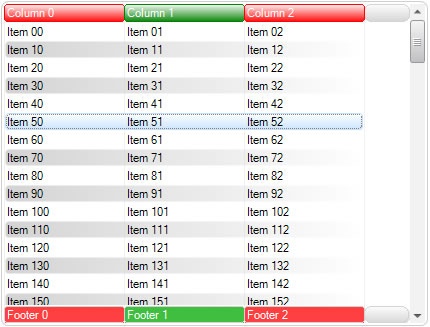

For example to change the appearance for items we can use the following code:
LidorSystems.IntegralUI.Lists.ListViewItem item = null;
for (int i = 0; i < this.listView1.Items.Count; i++)
{
item = this.listView1.Items[i];
// Make sure item uses its own color style settings
item.StyleFromParent = false;
item.NormalStyle.FillStyle = LidorSystems.IntegralUI.Style.FillStyle.Horizontal;
item.NormalStyle.BackColor = GetItemColor(i % modifier);
// Reset the appearance of subitems to default one
foreach (LidorSystems.IntegralUI.Lists.ListViewSubItem subItem in item.SubItems)
subItem.StyleFromParent = true;
}
Dim item As LidorSystems.IntegralUI.Lists.ListViewItem = Nothing
For i As Integer = 0 To Me.listView1.Items.Count - 1
item = Me.listView1.Items(i)
' Make sure item uses its own color style settings
item.StyleFromParent = False
item.NormalStyle.FillStyle = LidorSystems.IntegralUI.Style.FillStyle.Horizontal
item.NormalStyle.BackColor = GetItemColor(i Mod modifier)
' Reset the appearance of subitems to default one
For Each subItem As LidorSystems.IntegralUI.Lists.ListViewSubItem In item.SubItems
subItem.StyleFromParent = True
Next
Next
At first we need to make sure that the item will use its own color style settings instead of its parent ListView settings for all items, then we can apply changes. We are using the GetItemColor method to retrieve the correct color value for each item. Depending on item order and whether we will use 1 or more different colors for rows, we choose a specified color for that row. This is determined from i % modifier, where i is the row number and modifier is the number of different colors we want to apply. Here is the code for GetItemColor method:
private Color GetItemColor(int index)
{
switch (index)
{
case 1:
return Color.LightGray;
case 2:
return Color.LightBlue;
case 3:
return Color.Pink;
case 4:
return Color.LightGreen;
case 5:
return Color.Yellow;
case 6:
return Color.Azure;
case 7:
return Color.Gold;
case 8:
return Color.LightSalmon;
case 9:
return Color.Violet;
}
return Color.Empty;
}
Private Function GetItemColor(ByVal index As Integer) As Color
Select Case index
Case 1
Return Color.LightGray
Case 2
Return Color.LightBlue
Case 3
Return Color.Pink
Case 4
Return Color.LightGreen
Case 5
Return Color.Yellow
Case 6
Return Color.Azure
Case 7
Return Color.Gold
Case 8
Return Color.LightSalmon
Case 9
Return Color.Violet
End Select
Return Color.Empty
End Function
To avoid interference with color changes for subitems, we make sure that they have a default appearance set from ListView color settings for subitems.
// Reset the appearance of subitems to default one
foreach (LidorSystems.IntegralUI.Lists.ListViewSubItem subItem in item.SubItems)
subItem.StyleFromParent = true;
' Reset the appearance of subitems to default one
For Each subItem As LidorSystems.IntegralUI.Lists.ListViewSubItem In item.SubItems
subItem.StyleFromParent = True
Next
In similar way we can do this for columns and subitems, and create alternate colors for each column or subitem. Like items each column and subitem has their own color styles which we change and add our own custom settings. Here is an example:
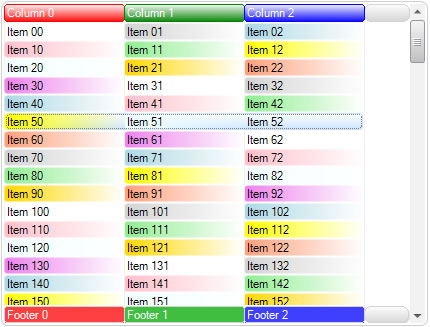
A sample project in C# and VB showing how to create ListView with items, columns and subitems in different colors is available for download from here: Alternate Colors in ListView