Columns with Fixed Width in ListView .NET
Created: 01 October 2008
Updated: 04 September 2013
In this article we are going to explain how to have columns with fixed width in ListView control. Also we will cover how to make some columns not scrollable by fixing them to the left or right side.
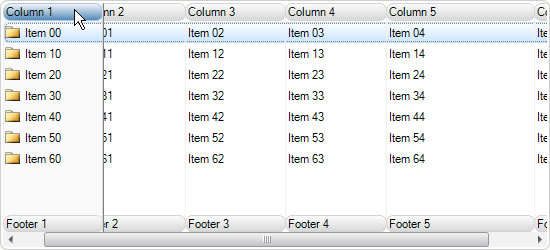

How to Fix Column Width
Each column in ListView control can have its width fixed to a specific value. In order to do this, we need at first to set the desired value for column width and then lock the column by setting its FixedWidth property value to true. This will make sure the columns don’t change their width.
In following code we are fixing the column width to 125 pixels:
column.Width = 125;
column.FixedWidth = true;
column.Width = 125
column.FixedWidth = True
The column will remain fixed until its FixedWidth property has its value changed back to false. Additionally, we can set the minimum and maximum values of column width, so that whenever a column is resized, it will remain within the range we have set.
// Set the range of column width between 75 and 150 pixels
column.MinWidth = 75;
column.MaxWidth = 150;
' Set the range of column width between 75 and 150 pixels
column.MinWidth = 75
column.MaxWidth = 150
If both of these properties have the same value, the column will also have a fixed width. The result is the same as when using the FixedWidth property.
How to Fix Column to the Left or Right Side
By default columns are not fixed to either control side, and they are scrollable. In order to fix a column to either left or right side of the ListView control, we will use the Fixed property which can accept one of three values:
- None - the column is not locked and is scrollable
- Left - the column is locked to the left side
- Right - the column is locked to the right side
For example to fix the second column to the left side we will use the following code:
this.listView1.Columns[1].Fixed = ColumnFixedType.Left;
Me.listView1.Columns(1).Fixed = ColumnFixedType.Left
This feature is useful when we have many columns and the current control view is too small for showing all columns at once. To avoid scrolling between columns, we may want to have some of them locked either to the left side. For example this is mostly used for columns that contain check boxes and we want to quickly check which items have met specific criteria.
Complete sample project in C# and VB is avaiable for download from here: Fixed Columns in ListView